As layoffs surge and job seekers flood the market, phishing campaigns impersonating major brands, including Coca-Cola and Ferrari, are ramping up—and they’re more sophisticated than ever.
The first scam we found uses a convincing booking page to collect personal details, then tricks victims into handing over their Google work account credentials through a fake sign-in page disguised inside what looks like a real Chrome browser window. What makes this campaign particularly dangerous is that it goes beyond the usual fake-window trick: the kit doesn’t just grab a password and stop—the source code shows it relaying user input to an attacker-controlled backend and dynamically serving different two-factor authentication prompts based on the server’s response, consistent with real-time phishing frameworks designed to defeat MFA.
If you’ve received an unexpected job offer asking you to “schedule a call,” here’s what to watch out for.
A perfect storm for job scams
These scams aren’t appearing in a vacuum. The US labor market has been under sustained pressure, as employers laid off more than 1.17 million workers in 2025—the most since the pandemic—all fueled by a combination of federal workforce reductions, corporate cost-cutting, and a broader hiring slowdown. The unemployment rate climbed to a four-year high of 4.5% in November 2025, and long-term unemployment, which includes those who are jobless for 27 weeks or more—has risen by 322,000 over the past year.
In speaking with CNBC, Heather Long, chief economist at Navy Federal Credit Union described the outlook bluntly: “It’s likely to be a tough spring for job seekers.”
Amid the turmoil, scammers are staying busy. According to the FTC, losses from job and employment scams surged from $90 million in 2020 to over $501 million in 2024, with reports in the category tripling over that period. As the Better Business Bureau’s (BBB) Melanie McGovern put it: “Employment scams are making a big comeback.”
We recently found two campaigns that illustrate how polished these lures have become: one impersonating Coca-Cola, the other impersonating Ferrari. Both exploit the desperation and trust that come with a competitive job market, and both deploy phishing kits that go well beyond a simple fake login page.
Scam 1: The Coca-Cola interview that steals your Google account
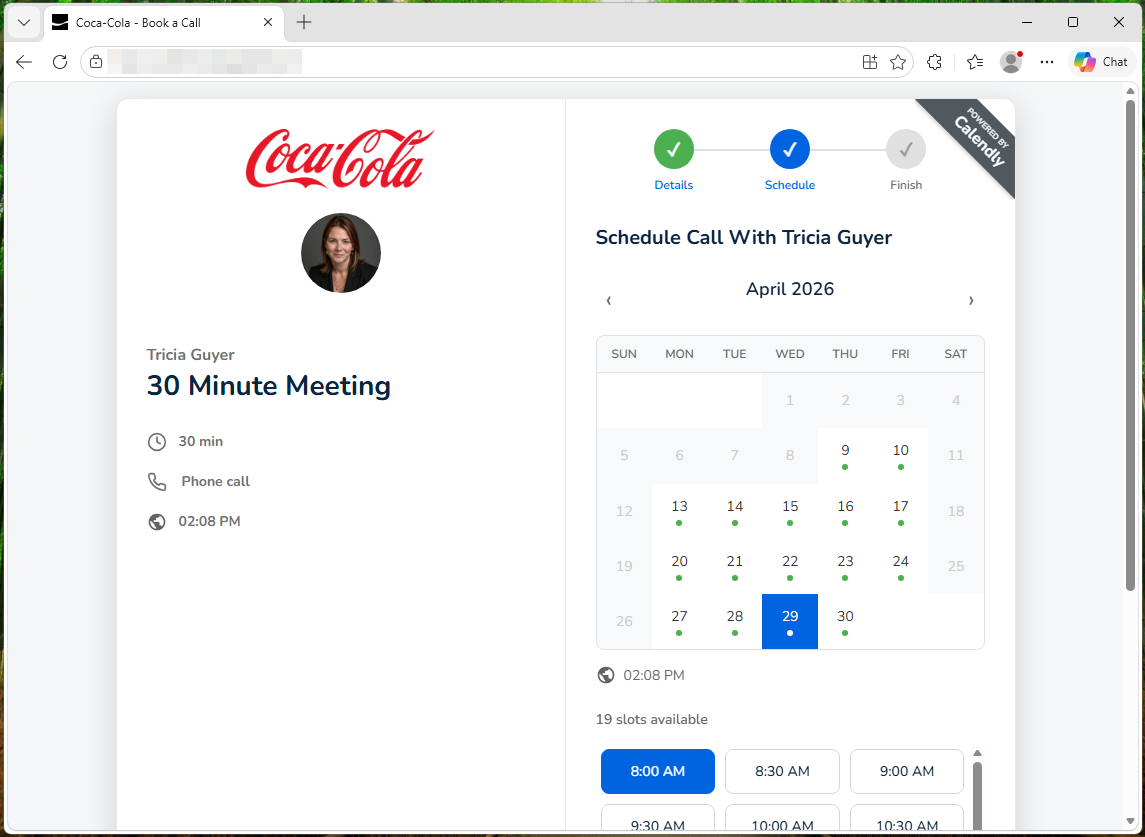
The attack begins with a link to what appears to be a Calendly scheduling page for a Coca-Cola recruiter named “Tricia Guyer.” You’re asked to fill in your name, email, what kind of job you’re interested in, and your work preference – nothing that would raise alarms during a normal job search.
The first red flag, though, is how you got there. Legitimate recruiters typically do not send unsolicited scheduling links without prior contact or without first receiving an application. All this means that if you didn’t apply for a role at Coca-Cola and you’ve never spoken to this person, treat the link with extreme suspicion, no matter how professional the page looks.
The fake browser window that fools even careful users
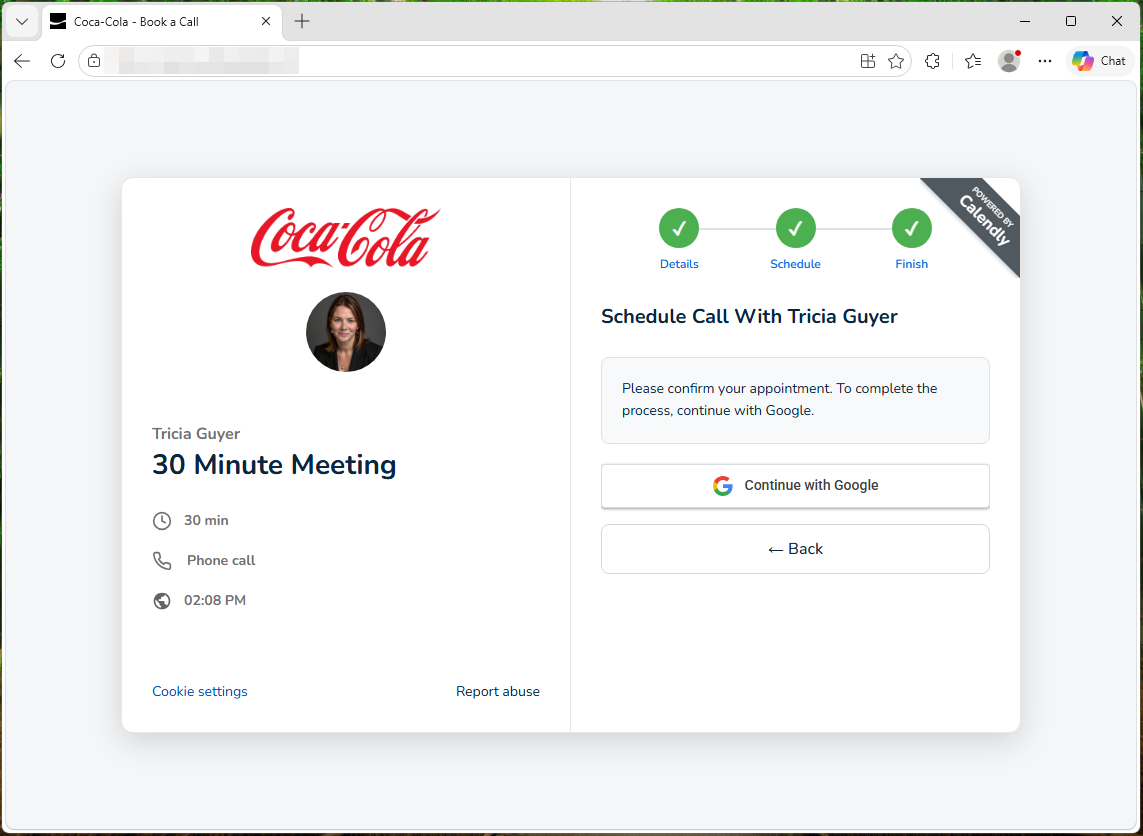
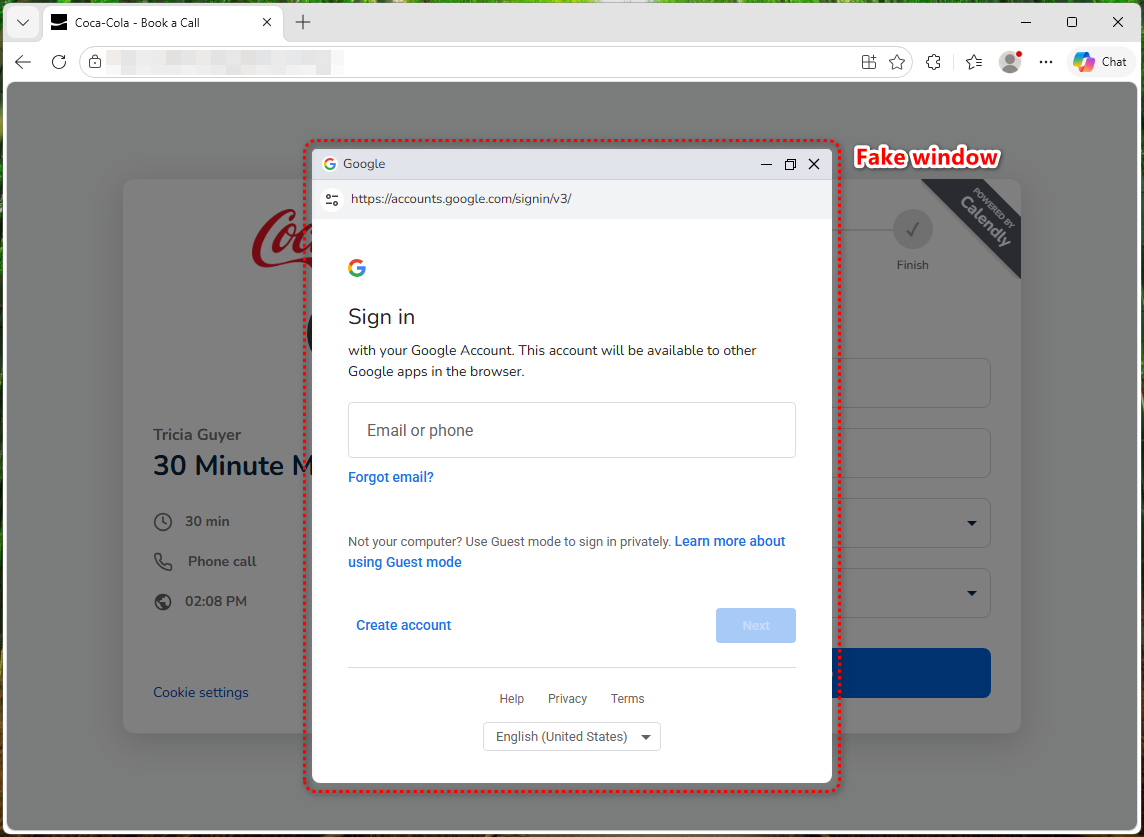
After you fill in the booking form, you’re asked to pick a date and click “Continue with Google.” Here, something sneaky happens. Instead of opening a real Google login page, the site draws a simulated Chrome browser window inside the web page itself, rather than opening a real browser pop-up. It even has a title bar with minimize, maximize, and close buttons. It also has a URL bar that says https://accounts.google.com/signin/v3/.
In many ways, it looks exactly like a pop-up window from Google—but it’s not. It’s just a picture of one, with form fields layered on top.

The fake Calendly page requests you to schedule a meeting time 
Near the end of the scam, you are asked for sign-in options 
Finally, a malicious, fake sign-in page is presented
They don’t just want your password—they want your verification code too
Most fake browser window attacks are relatively simple: they show you a convincing login form, grab your email and password, and stop there. If you have two-factor authentication enabled, those stolen credentials alone aren’t enough to get into your account, as the attacker hits a wall at the verification step.
This kit doesn’t hit that wall.
Once you type in your email and password, the page begins polling the attacker’s backend server every three seconds—a pattern visible in the source code—waiting for instructions on what to show you next. On the other end, the submitted credentials are sent to the attacker’s server via a dedicated login endpoint. The kit’s behavior—immediately polling for an authentication challenge type after submission—is consistent with the attacker using those credentials against the real Google login in parallel. The kit contains four separate verification screens: for email codes, authenticator codes, SMS codes, and Google phone prompts. When Google asks the attacker for a second verification step, the backend tells the page which screen to serve, and the source code routes the victim to the matching prompt based on an authType value in the server’s response. You see what looks like a normal Google prompt and hand over the code without thinking twice.
Because this back-and-forth happens every few seconds, the attacker can relay each challenge and punch your response into the real Google login almost instantly. The backend can also push custom error messages to your screen. The code checks for an error field in the server response and displays it directly—like “Wrong password, try again”—to force a retry if something doesn’t work on their end. This turns what would normally be a simple credential grab into a potential full account takeover, even with two-factor authentication enabled. By the time you see the “Meeting Confirmed” page, your credentials and any verification codes you entered have already been sent to the attacker’s server.
Personal Gmail? They don’t want it
One telling detail: the form rejects @gmail.com addresses with the message “Please use your work or business email”—a filter that is hardcoded in the source code. This targets corporate Google Workspace accounts specifically. The reason is simple. A compromised work account is far more valuable as it can give access to company emails, shared documents, internal calendars, and be used to launch further attacks against coworkers.
Scam 2: The Ferrari career page that steals your Facebook credentials
The Coca-Cola kit isn’t an isolated case. We found a second phishing campaign—this one impersonating Ferrari—that takes a different but equally effective approach.
The page presents itself as Ferrari’s official corporate career portal. It includes the company’s navigation bar, branding, and sections you’d expect on a real employer’s hiring page—headings like “Career Opportunities,” “Focus on People,” “Passion at the Center,” and “Excellence.”
But the trap is at the top. Overlaid on the page is a pop-up claiming “You’ve Been Invited to Apply” for a marketing role. It explains that you are accessing the page via a “direct email invitation to expedite the selection process.” It then asks you to either “Continue with Facebook” or to enter your email with a passcode.
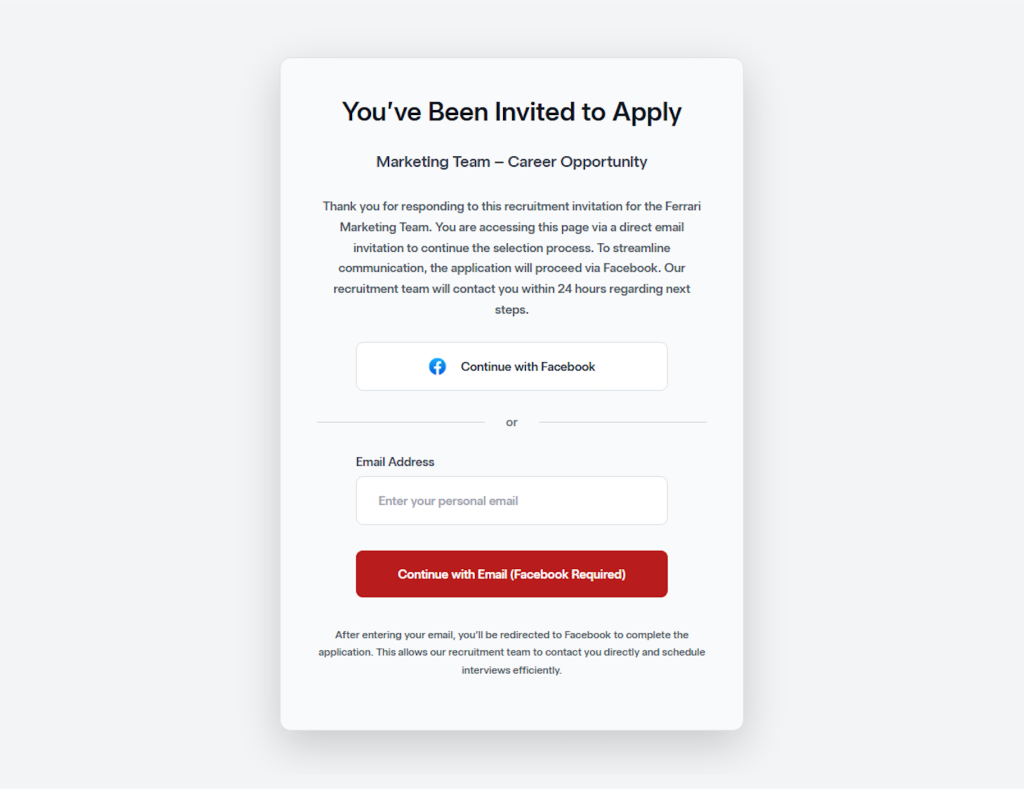
This is the phishing hook. Whether you click the Facebook button or enter your email, you’re redirected to a fake Facebook login page designed to harvest your credentials. The approach mirrors a common OAuth phishing technique: many legitimate job application portals do allow sign-in through social media accounts, which is exactly what makes this trick so convincing. The victim isn’t being asked to do anything unusual—just “log in with Facebook” to complete a job application.
Unlike the Coca-Cola campaign—which targeted corporate Google Workspace accounts and featured a sophisticated MFA-bypass kit—the Ferrari scam casts a wider net by going after Facebook credentials. A compromised Facebook account can give attackers access to linked services, personal messages, and identity information that fuels further social engineering. It also provides a launchpad for spreading scams to the victim’s contacts.
The common thread between both campaigns is the bait: a prestigious company name and the promise of a career opportunity. In a labor market where millions of people are actively searching for work, that combination is devastatingly effective.
How to protect yourself
- Be suspicious of unsolicited job offers. If you didn’t apply for the role and don’t know the recruiter, don’t click the link. Look up the company’s careers page directly and verify whether the position and recruiter are real.
- Know how to spot a fake browser window:
- Try dragging the “pop-up”: A real pop-up moves freely outside your main browser window, while a fake one gets stuck at the edges because it’s part of the page.
- Try minimizing your browser: A real pop-up stays on your desktop as its own window, while a fake one disappears along with the page.
- Inspect the URL bar inside the window: It may look correct, but it’s just a graphic. You can’t click on it, select the text, or type a new address the way you can in a real browser.
- Even if the pop-up passes the above tests, always double-check the URL before entering any credentials.
- Never enter your passwords on a scheduling page. Legitimate services like Calendly do not require your email password to book a meeting.
- If you already entered your credentials, change your Google password immediately and revoke all sessions at myaccount.google.com > Security > Your devices.
The job market is a hunting ground for scammers
Job seekers are uniquely vulnerable to phishing. You’re expecting emails from strangers, you’re used to filling out forms, and you’re motivated enough by the opportunity not to question an extra login step. With the US unemployment rate hovering around 4.3 to 4.4% through early 2026, hundreds of thousands of recently displaced federal workers competing for private-sector roles, and hiring at its lowest pace in years, the pool of potential victims has never been larger. Scammers know this, and they’re investing serious effort into making their lures look legitimate, complete with real company logos, professional booking interfaces, and pixel-perfect fake login pages. These kits are getting better faster than most people’s instincts are adapting.
The best protection isn’t spotting the fake—it’s knowing that no legitimate hiring process will ever require you to authenticate through an unfamiliar page, whether it’s dressed up as Google, Facebook, or anything else. When in doubt, close the tab, go to the company’s website yourself, and apply the old-fashioned way.
Indicators of Compromise (IOCs)
Domain
- hrguxhellito281[.]onrender[.]com (backend server)
We don’t just report on threats—we remove them
Cybersecurity risks should never spread beyond a headline. Keep threats off your devices by downloading Malwarebytes today.